Updates v. upgrades: what's the difference? - E-N Computers
Components/Steps:
- Check for updates
- Confirmation
- Download
- Update
- Uninstall + Install
- Shutdown + Patch
- Restart
-
Reckless deployment
This is the easiest strategy, which means we just nuke everything, and recreate the new version. Usually good for Dev/Test scenarios or very low impact applications.
-
A/B deployment (blue/green deployment) (Wikipedia)
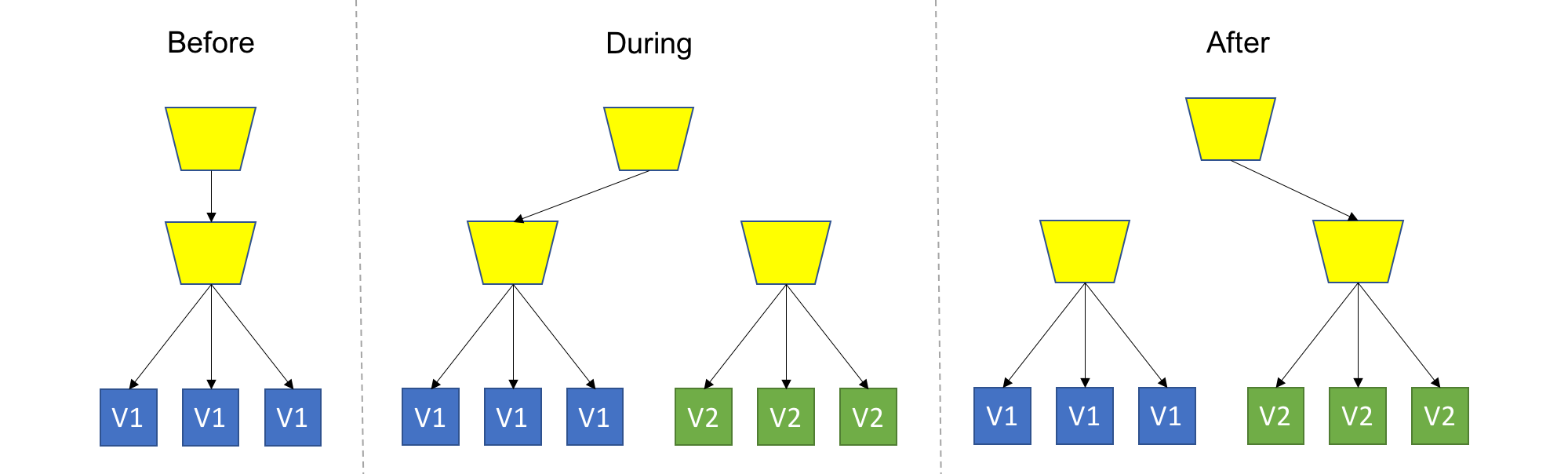
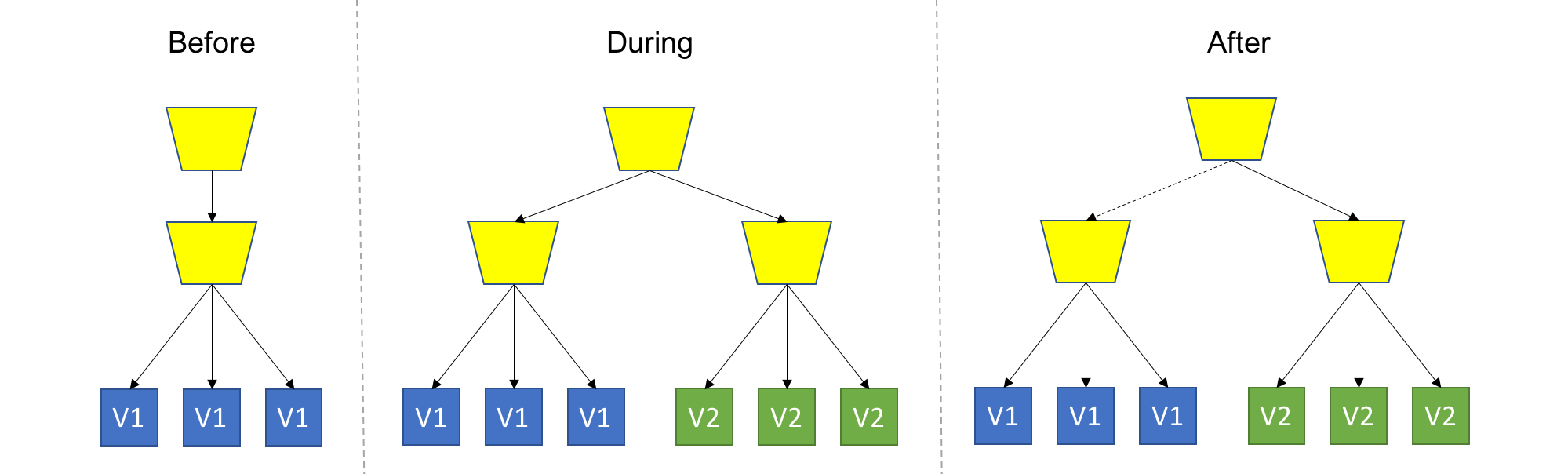
TL;DR: Spin up a new separate deployment for the new version, without affecting the current one. Test the new version, and once ready start routing users to the new version.
-
Isolated A/B deployment
This is the safest strategy, and is used by many for production workloads. To provide that safety, we won't touch anything that's currently running, and provision an entire copy of the application, or the module we are upgrading aside. It's up to you to decide on the scope of deployment (or scope of isolation), for example: Do you recreate the entire system, or just the updated module? Do you create a separate Load Balancer for the new version deployment, or add a new rule to the existing Load Balancer? Do you share configuration between version? These are just some of the questions that might come up, and it's up to you or your tools to decide.
One thing is for sure - the new version should be completely isolated from the current version deployment, this is in contrast to Rolling Upgrade where, for the duration of the upgrade, we had a heterogeneous deployments consisting of old and new code. As a consequence, backward compatibility is not mandatory here.
-
Draining
-
Switch back
-
Staged deployment
A common variant of this strategy is staged deployment/slot swapping. The scope of the deployment (or scope of isolation) in this case is the entire application (meaning we have an entire copy of the whole system on stand-by). In this practice we always have 2 copied of our application infrastructure around, even if an upgrade is not currently in progress. One environment is the production, and the other is pre-production, usually called 'stage'. We can use the stage regularly for stuff like QA/UAT/Repros/CI. We always deploy to stage, never to production. Therefore, the stage will always be ahead of prod, representing the latest candidate for production. As in regular Blue/Green, we should test and validate stage without affecting prod, and once we are good for deployment, we simply swap the routing between the two environments, meaning stage becomes prod and prod becomes stage. This is usually done using updating DNS records (but not necessarily). Again, we can easily swap back if something bad happens.
You might be thinking about exposing that Stage environment (or that new "green" deployment) for actual users to try. This is a good idea, which I call Canary Deployment.
Details
In blue–green deployments, two servers are maintained: a "blue" server and a "green" server. At any given time, only one server is handling requests (e.g., being pointed to by the DNS). For example, public requests may be routed to the blue server, making it the production server and the green server the staging server, which can only be accessed on a private network. Changes are installed on the non-live server, which is then tested through the private network to verify the changes work as expected. Once verified, the non-live server is swapped with the live server, effectively making the deployed changes live.
Using this method of software deployment offers the ability to quickly roll back to a previous state if anything goes wrong. This rollback is achieved by simply routing traffic back to the previous live server, which still does not have the deployed changes. An additional benefit to the blue–green method of deployment is the reduced downtime for the server. Because requests are routed instantly from one server to the other, there is ideally no period where requests will be unfulfilled.
While blue–green deployment reduces risks during updates, it also requires additional resources since two environments need to be maintained simultaneously. The cost of running duplicate infrastructure, even temporarily, can be prohibitive for smaller organizations. Furthermore, complex database migrations may pose challenges, as the system must ensure that both the blue and green environments have consistent data. Solutions to these issues often involve using database migration tools that allow for backward compatibility between environments.
-
-
Reverse canary deployment (backup deployment)
Replace the old version with the new one, and allow users to switch back to the old version if they have issues with the new one.
Compared to canary deployment, this increases feedback from users and thus lowers the cost of testing/monitoring, at the cost of more affected users. The deployment speed is also faster.
To reduce the impact on users:
-
Staged-backup deployment (vertical rolling deployment): staged deployment + reverse canary deployment
Three environments: production, stage/dev, and backup/old.
-
-
Canary deployment (A/B testing)
TL;DR: Deploy the new version into production alongside the old one, carefully controlling who gets to use the new version. Monitor and tune the experiment while gradually expanding it’s population.
It can be seen as an advanced usage of one of the previous strategies: Use any strategy that you'd like to introduce new code into the system, with the key difference of allowing real users to use the new version in production. Naturally, you wouldn't want all users to get all new, premature features, so you'll want to control which users get which pieces of the new version. This can be implemented at the load balancing/proxy layer, using application settings, at runtime, or any other way that works for you. The basic and common implementation of Canary uses Blue/Green Deployment with the addition of smart routing of some users to the new, "green" version.
- More monitoring
- A/B Testing
- Dark features
-
Rolling deployment (gradual deployment, staggered rollout)
This is a basic strategy that is about adding new code into an existing deployment. The existing deployment becomes a heterogeneous pool of old version and new version, with the end goal of slowly replacing all old instances with the new instances. The terms ‘Instance’ and ‘Pool’ can mean different things depending on your technology stack (VM, Container, Process, etc…).
- Health and monitoring
- Roll back
- Backward compatibility
You might be thinking about doing some smart routing of users to allow some users to consistently get a specific version, or to expose only a subset of users to new version - You are on the right track, but then I wouldn’t call it a Rolling Upgrade anymore (but a Canary Deployment).
-
Versioned deployment
TL;DR: Always keep all versions alive, while letting the user choose which version to use
Offline software can naturally implement this strategy.