https://lqk9511.github.io/blog/share/git-pull--rebase--autostash.html
git config pull.rebase true
git config rebase.autoStash truehttps://support.atlassian.com/bitbucket-cloud/docs/configure-your-dvcs-username-for-commits/
Open the command line.
Set your username:
git config --global user.name "FIRST_NAME LAST_NAME"Set your email address:
git config --global user.email "MY_NAME@example.com"To set repository-specific username/email configuration: From the command line, change into the repository directory.
Set your username:
git config user.name "FIRST_NAME LAST_NAME"Set your email address:
git config user.email "MY_NAME@example.com"Verify your configuration by displaying your configuration file:
cat .git/configalias use="nvm use 18"
alias 18="use"
alias s="git status"
alias dot="git add ."
alias amend="git commit --amend --no-edit "
alias amenda="git commit --amend --no-edit -a"
alias c="git commit -m "
alias ac="git commit -am "
alias force="git push --force-with-lease"
alias push="git push"
alias i="git rebase -i "
alias go="git rebase --continue"
alias abort="git rebase --abort"
alias -="git checkout -"
alias start="npm start"
alias remotion="npm run remotion"
function up
# Extract the current branch name
set -l current_branch (git branch --show-current)
# Push the current branch to the remote named 'origin'
git push -u origin $current_branch
end
alias pub="up"
alias publish="up"# https://www.git-tower.com/learn/git/faq/change-author-name-email/
git commit --amend --author="John Doe <john@doe.org>"git config --global core.editor "code --wait"As invoking Git: discard changes in VSCode will cause the following error:
> git checkout -q -- /Users/chris_xing/Projects/rn_esub20/src/screens/CreateApplication/validation/BasicInfo.ts
error ReactNativeStarter@0.0.1: The engine "node" is incompatible with this module. Expected version ">=18". Got "17.9.1"
error Commands cannot run with an incompatible environment.
Solution
nvm uninstall 17

nvm alias default 18# commit ID in source branch: 10001 10002
# in target branch
git cherry-pick 10001 10002
# cherry pick without committing
git cherry-pick 10001 -n # --no-commithttps://stackoverflow.com/a/51914162
Git supports exclude certain paths and files by pathspec magic :(exclude) and its short form :!.
So you can easily achieve it as the following command.
git add --all -- :!main/dontcheckmein.txt
git add -- . :!main/dontcheckmein.txt
Actually you can specify more:
git add --all -- :!path/to/file1 :!path/to/file2 :!path/to/folder1/*
git add -- . :!path/to/file1 :!path/to/file2 :!path/to/folder1/*https://stackoverflow.com/questions/2003505/how-do-i-delete-a-git-branch-locally-and-remotely
The short answers
If you want more detailed explanations of the following commands, then see the long answers in the next section.
git push origin --delete <branch>  # Git version 1.7.0 or newer
git push origin -d <branch>        # Shorter version (Git 1.7.0 or newer)
git push origin :<branch> # Git versions older than 1.7.0git branch --delete <branch>
git branch -d <branch> # Shorter version
git branch -D <branch> # Force-delete un-merged branchesDeleting a local remote-tracking branch
git branch --delete --remotes <remote>/<branch>
git branch -dr <remote>/<branch> # Shorter

git fetch <remote> --prune # Delete multiple obsolete remote-tracking branches
git fetch <remote> -p # Shorterhttps://stackoverflow.com/a/47304256
// ❤
git branch -d `git branch --list '3.2.*'`

OR
// https://stackoverflow.com/a/3670479
git branch -D `git branch | grep -E '^3\.2\..*'`git pull --rebase origin/dev
git checkout -b BRANCH_NAME --no-track origin/dev
git push --force-with-lease origin devhttps://git-scm.com/book/en/v2/Git-Tools-Reset-Demystified
| Tree | Role |
|---|---|
| HEAD | Last commit snapshot, next parent |
| Index | Proposed next commit snapshot |
| Working Directory | Sandbox |
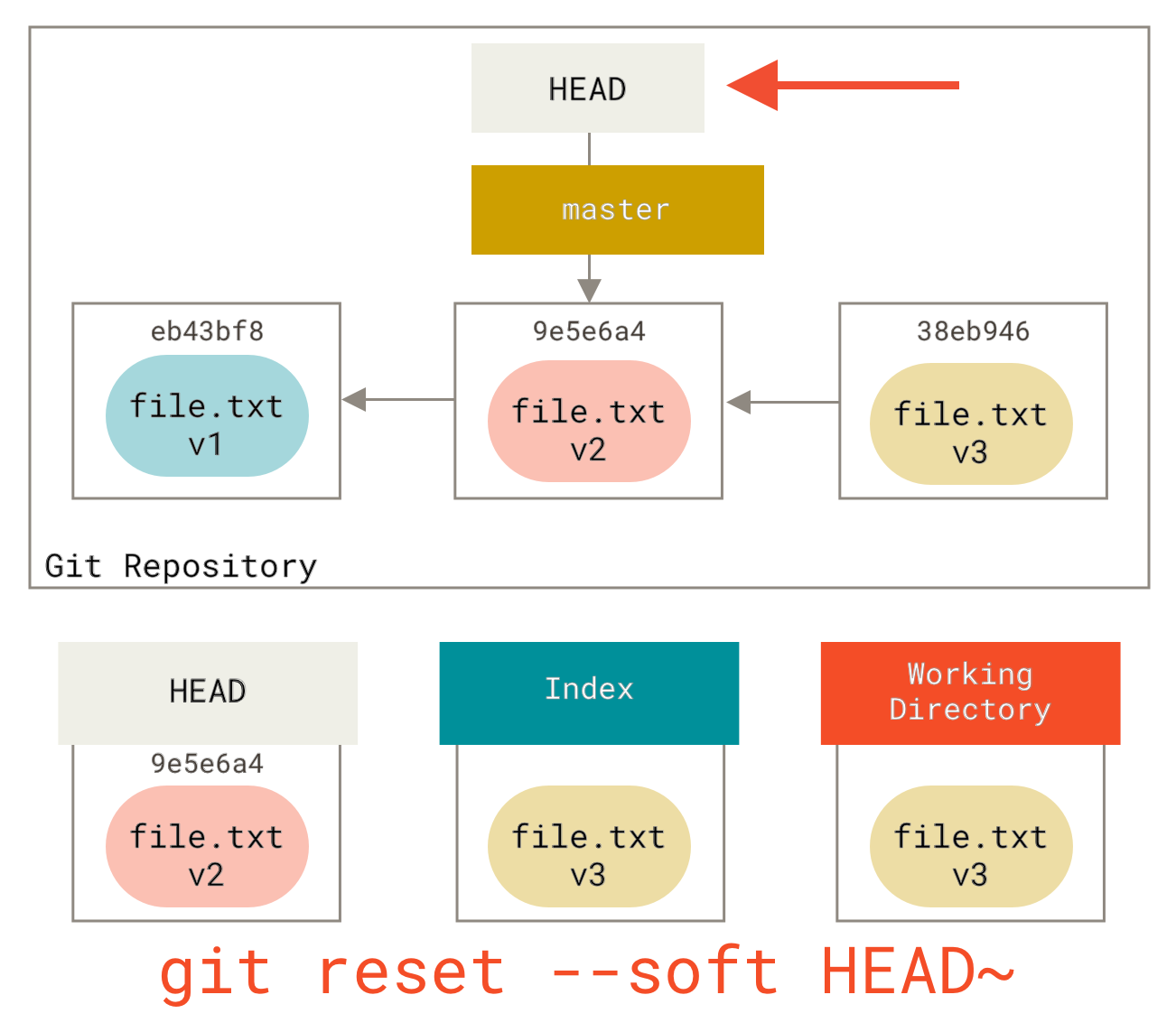
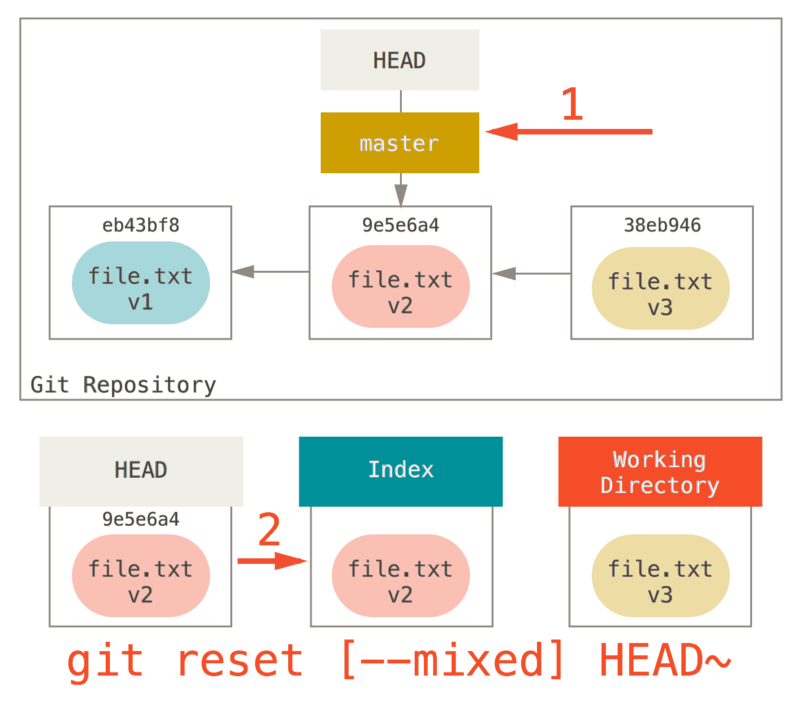
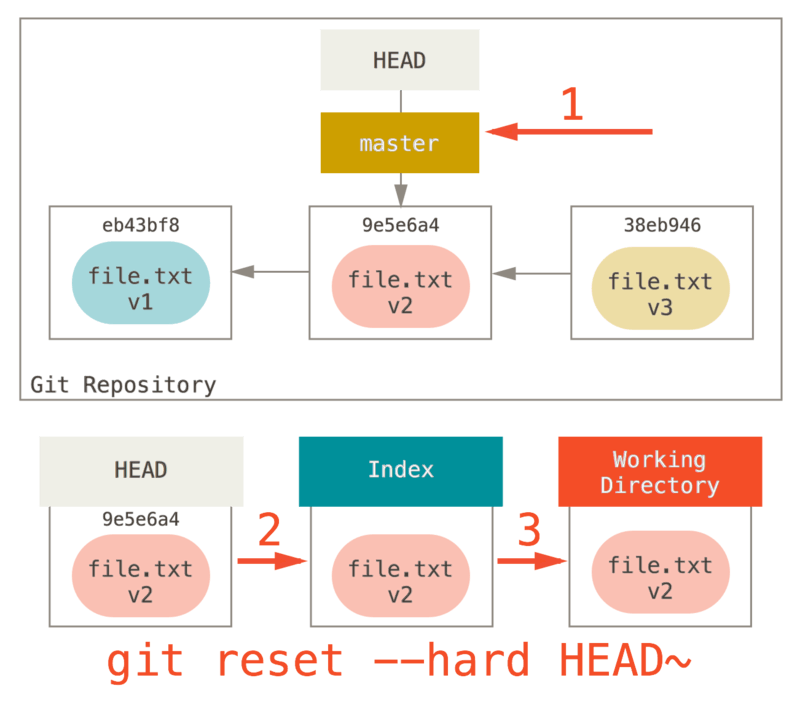
Recap
The reset command overwrites these three trees in a specific order, stopping when you tell it to:
- Move the branch HEAD points to (stop here if --soft).
- Make the index look like HEAD (stop here unless --hard).
- Make the working directory look like the index.
Reset With a Path
- Move the branch HEAD points to (skipped).
- Make the index look like HEAD (stop here).
checkout with a path is similar to reset with a path, BUT it will overwrite the working directory.
Squashing
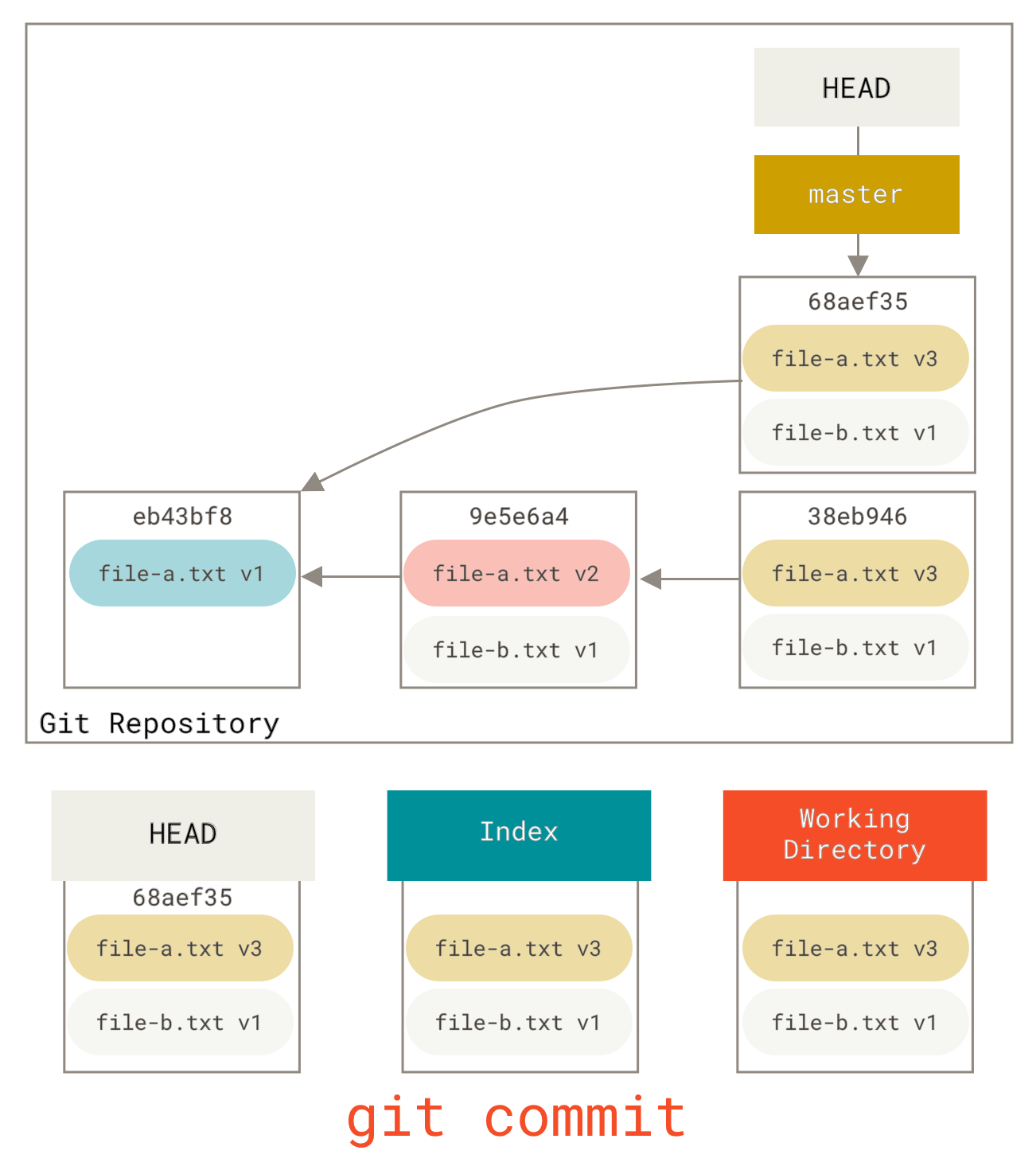
Git 重写提交纪录
操作总结:
- 使用 git reset --soft master 将 HEAD 指针移回到 master 分支的最后一个提交,但保留所有更改在暂存区
- 使用 git commit -m "PHKLPARCOMMSPREAD-44 Implement Professional Investor feature" 创建新的合并提交
--force-with-lease 是安全的强制推送方式,它会:
- 检查远程分支是否有其他人的新提交
- 如果有冲突会拒绝推送,避免覆盖他人的工作
- 如果安全则执行强制推送