You may develop with following compilers:
- GNU's "GCC".
- Microsoft's "MSVC".
You may choose either one of them for developing & building the project.
- When developing with GCC.
- When developing with MSVC.
Either compiler you choose, when dealing with memory allocations, we require to test the library, with Valgrind. It allows us to check for memory leaks
-
In case you choose to work with GCC:
-
You probably own a *NIX machine, and thus you may test your code with Valgrind locally.
To do so, please install Valgrind with:
sudo apt install valgrind -yAnd make sure that in
config.sh, the variableRUN_WITH_VALGRINDis set totrue. -
In case you don't want to test your code with Valgrind locally, then in
config.sh, set the variableRUN_WITH_VALGRINDtofalse.
-
-
In case you choose to work with MSVC:
Unfortunately, you cannot test your code with Valgrind locally.
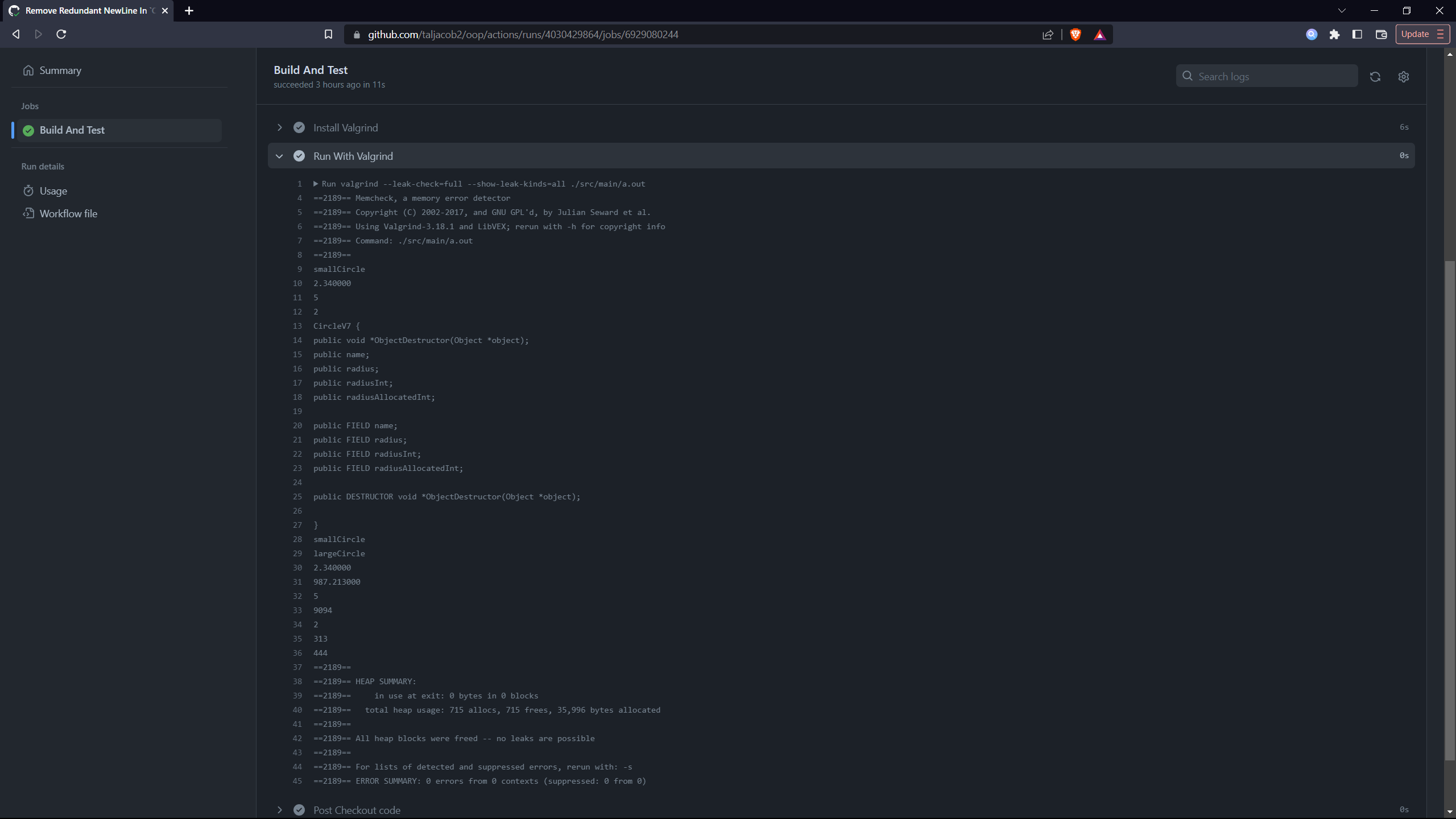
Either compiler you choose (especially with MSVC), when you push your commits to GitHub, watch the "Build & Test" GitHub Action and verify that the "Run With Valgrind" step is finishing successfully without any memory leaks. The "Build & Test" GitHub Action is triggered on every commit push. So feel free to test your code for memory leaks.
For example:
See Release.md.