As part of the KDAN ecosystem, ComPDF SDK for Web is a powerful JavaScript-based PDF library that enables developers to easily add PDF viewing, annotation, editing, and more to their applications across multiple frameworks including Vanilla JavaScript, Vue.js, React, Angular, Next.js, Nuxt.js, and more — with just a few lines of code.
If you find this library helpful, please consider giving us a ⭐ Star on GitHub! Have feedback or questions? Join the conversation in our Discussions.
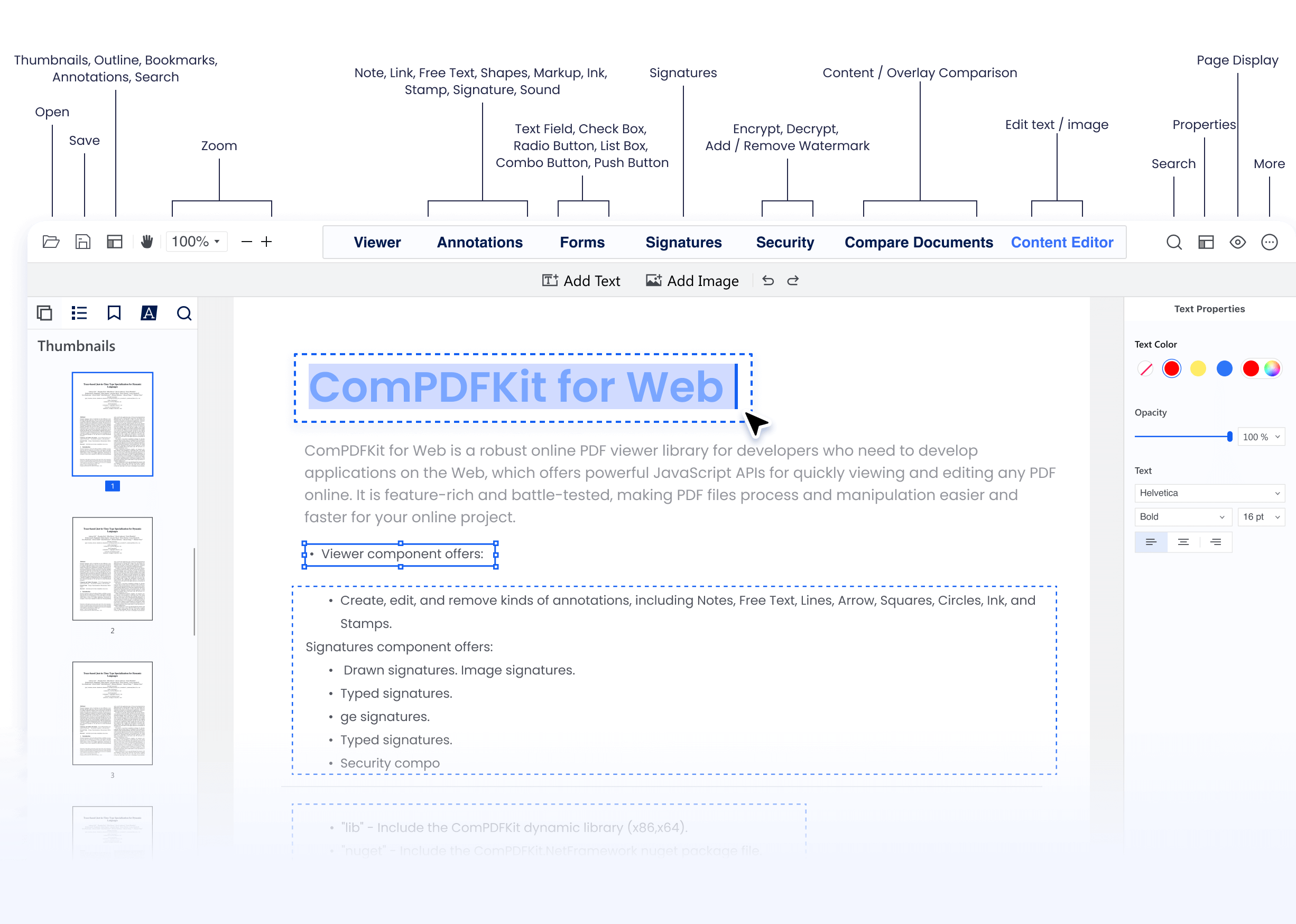
Why ComPDF SDK?
-
Easy to Integrate: Clear docs and a powerful JavaScript API let you add PDF features in just a few lines of code.
-
Fully Customizable UI: Ship your own look and feel with source-level control over every UI element.
-
Comprehensive PDF Features: View, annotate, edit, convert, OCR, redact, sign, compress, compare, and more — all in one SDK.
-
5×24 Expert Support: One-to-one technical assistance via email, phone, and on-site service.
- Supported Features
- How to Make a Next.js PDF Viewer App
- Free Trial and License
- Changelog
- Support
- Note
- Related
-
Viewer:
- Fast and smooth PDF rendering and viewing
- Display Modes - single/double page, vertical & horizontal scrolling, cover mode, crop mode
- Text Search & Selection
- PDF Navigation - outlines, bookmarks
-
Annotations:
-
Notes - add longer comments with adjustable icon shape and color
-
Ink - freehand drawing with customizable color, opacity, line thickness
-
Text - add, move, resize text directly on page
-
Inspector - adjust annotation looks (line styles, borders, colors, opacity, font)
-
Comment on Annotations and Update Status
-
Import & Export & Flatten Annotations (XFDF, FDF, JSON)
-
Highlight, Underline, Strikeout, Squiggly
-
Shapes - Rectangle, Oval, Line, Arrow, Polygon, Polyline, Cloud
-
Stamps, Sound, Movie, File Attachment, Link, Distance, Perimeter, Area
-
-
Document Editor:
- Page manipulation - insert, delete, rotate, reorder, extract, crop
- Split PDF, Merge PDF
-
Content Editor: Edit PDF text and images directly like in Word
-
Signatures:
- Electronic Signatures - draw, type, image signatures
- Digital Signatures - certificate-based signature validation
-
Forms:
- Process fillable and static PDF forms
- Form filling, form creation, form flattening
-
Security:
- Encryption - set open password, permission password
- Restrict printing, copying, editing
-
Redaction: Permanently remove sensitive content from PDFs
-
Layers: View, edit, display, lock, and export specific layers within a file
-
Color Separation: Identify color models like CMYK, PMS. Toggle color visibility and view details.
-
Measurement: Distance, area, perimeter measurement tools
-
Compare Documents: Side-by-side document comparison to highlight differences
- The latest stable version of Node.js.
- A package manager compatible with npm.
- Apply the License Key: Contact ComPDFKit's sales team to get a free 30-day license to test the project.
Create a new Next.js project:
npx create-next-app@latest
cd compdfkit-app
During setup, Next.js will prompt you with a series of questions. For this example, choose the default options.
- Install the webviewer package:
npm i @compdfkit_pdf_sdk/webviewer --save- Copy the static resource files to your project's public folder:
cp -a ./node_modules/@compdfkit_pdf_sdk/webviewer/dist/. ./public/webviewer-
Add your PDF document to the
public/webviewer/exampledirectory. -
If you chose JavaScript during setup, add the following code to your
app/page.jsfile:
'use client';
import React, { useRef, useEffect } from 'react';
import Head from 'next/head'
import Webviewer from '@compdfkit_pdf_sdk/webviewer';

export default function Home() {
  const viewer = useRef(null);
  let docViewer = null;

  useEffect(() => {
    Webviewer.init({
      path: '/',
      pdfUrl: './example/developer_guide_web.pdf',
      license: '<Input your license here>',
    }, viewer.current).then((instance) => {
      docViewer = instance.docViewer;
      docViewer.addEvent('documentloaded', async () => {
        console.log('ComPDFKit Web Demo loaded');
      })
    })
  });

  return (
    <>
      <Head>
        <title>ComPDFKit Web Viewer</title>
        <meta name="description" content="Generated by create next app" />
        <meta name="viewport" content="width=device-width, initial-scale=1" />
        <link rel="icon" href="/favicon.ico" />
      </Head>
      <div id="webviewer" ref={viewer} style={{ height: '100vh', overflow: 'hidden' }}></div>
    </>
  )
}npm run devOpen http://localhost:3000 on your browser.
Replace the <Input your license here> field in the app/page.js with the license you get from our Team.
ComPDF SDK for Web supports flexible licensing options. You can apply for a license online to use it, reducing the process of contacting the service team and saving you time. If you need more information, you can contact our sales team. Each license is valid only for the root domain name and any of its subdomains.
The license we provide on Github can only run the demo. If you want to integrate our Web PDF SDK into your own Next.js project, please apply for a free trial license on the website.
Please note that it is not allowed to distribute any documents, sample code, or source code from the ComPDF SDK package to third parties.
Go to our changelog to keep up with the latest updates, improvements, and bug fixes.
ComPDF has a professional R&D team that produces comprehensive technical documentation and guides to help developers. Also, you can get an immediate response when reporting your problems to our support team.
-
For detailed information, please visit our Guides page.
-
For technical assistance, please reach out to our Technical Support.
-
To get more details and an accurate quote, please contact our Sales Team.
We are glad to announce that you can register a ComPDF API account for a free trial to process 200+ API calls per month for free.
-
Download ComPDF SDK for Web in npm.
-
Integrate ComPDF SDK for Web into Salesforce, SharePoint, Microsoft Teams, etc.
-
Recognize and extract data from PDFs with our online Extract Demo