Important: The default branch is main, which tracks active development and may be ahead of the latest supported release.
For the latest stable release use the release/26.03 branch.
See the corresponding NeMo Retriever Library documentation.
NeMo Retriever Library is a scalable, performance-oriented document content and metadata extraction microservice. It uses specialized NVIDIA NIM microservices to find, contextualize, and extract text, tables, charts and infographics that you can use in downstream generative applications.
Note
NeMo Retriever extraction is also known as NVIDIA Ingest and nv-ingest.
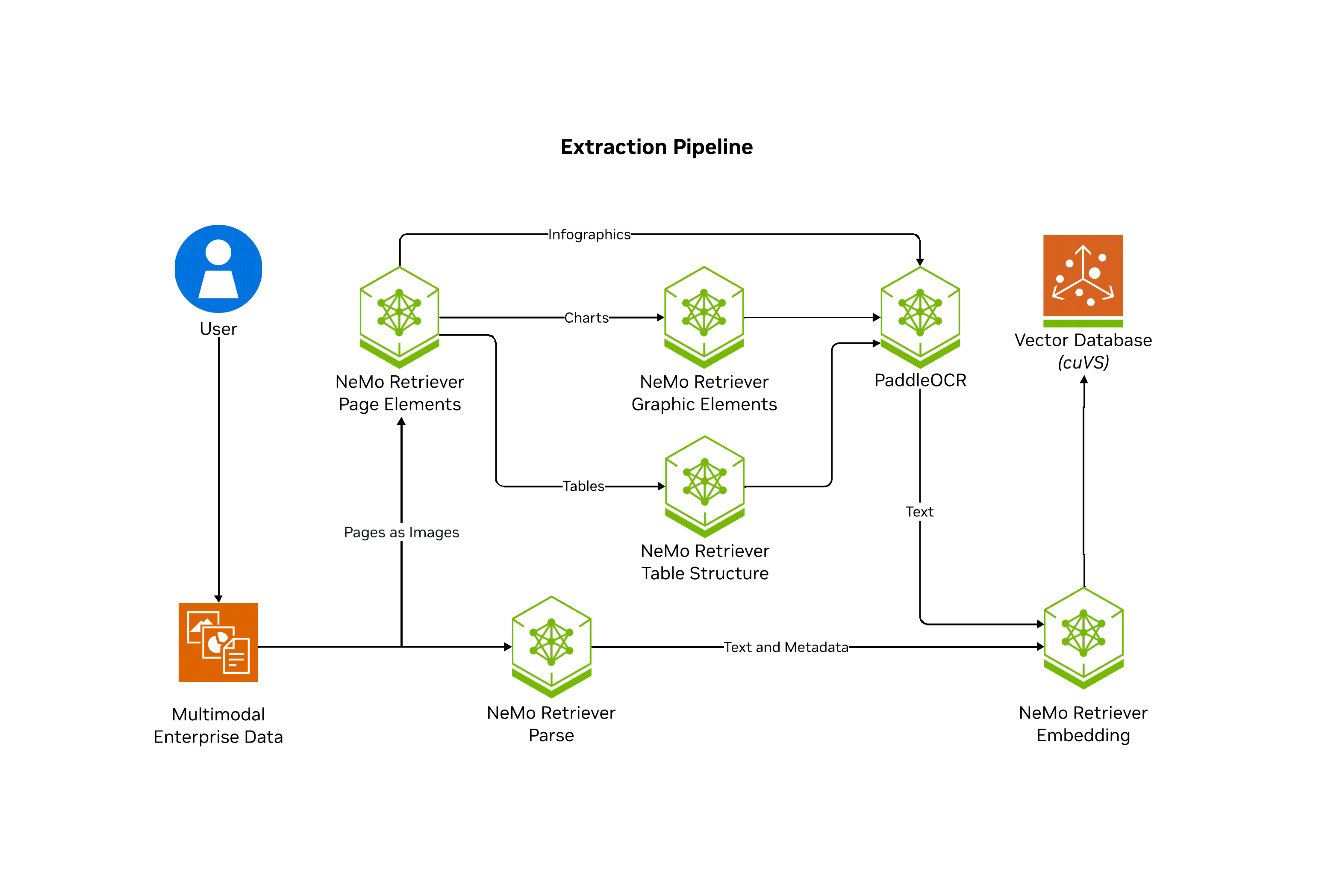
NeMo Retriever Library enables parallelization of splitting documents into pages where artifacts are classified (such as text, tables, charts, and infographics), extracted, and further contextualized through optical character recognition (OCR) into a well defined JSON schema. From there, NeMo Retriever Library manages computaiton of embeddings for the extracted content as well as storing them in a vector database Milvus.
The following diagram shows the NeMo Retriever Library pipeline.
For production-level performance and scalability, we recommend that you deploy the pipeline and supporting NIMs by using Kubernetes (helm charts). For more information, refer to prerequisites.
Note: Along with the recent repo name change, we're phasing out the nv-ingest APIs and simplifying the dependencies. You can follow this work and see the forward looking API via the nemo_retriever library subfolder.
For small-scale workloads, such as workloads of fewer than 100 PDFs, you can use our in development library setup which works with HuggingFace models on local GPUs or with NIMs hosted on build.nvidia.com.
After following the quickstart installation steps, you can start ingesting content like with the following snippet:
from nemo_retriever import create_ingestor
from nemo_retriever.io import to_markdown, to_markdown_by_page
from pathlib import Path

documents = [str(Path("../data/multimodal_test.pdf"))]
ingestor = create_ingestor(run_mode="batch")

# ingestion tasks are chainable and defined lazily
ingestor = (
  ingestor.files(documents)
  .extract(
    # below are the default values, but content types can be controlled
    extract_text=True,
    extract_charts=True,
    extract_tables=True,
    extract_infographics=True
  )
  .embed()
  .vdb_upload()
)

# ingestor.ingest() actually executes the pipeline
# results are returned as a ray dataset and inspectable as chunks
ray_dataset = ingestor.ingest()
chunks = ray_dataset.get_dataset().take_all()
You can see the extracted text that represents the content of the ingested test document.
# page 1 raw text:
>>> chunks[0]["text"]
'TestingDocument\r\nA sample document with headings and placeholder text\r\nIntroduction\r\nThis is a placeholder document that can be used for any purpose...'

# markdown formatted table from the first page
>>> chunks[1]["text"]
'| Table | 1 |\n| This | table | describes | some | animals, | and | some | activities | they | might | be | doing | in | specific |\n| locations. |\n| Animal | Activity | Place |\n| Giraffe | Driving | a | car | At | the | beach |\n| Lion | Putting | on | sunscreen | At | the | park |\n| Cat | Jumping | onto | a | laptop | In | a | home | office |\n| Dog | Chasing | a | squirrel | In | the | front | yard |\n| Chart | 1 |'

# a chart from the first page
>>> chunks[2]["text"]
'Chart 1\nThis chart shows some gadgets, and some very fictitious costs.\nGadgets and their cost\n$160.00\n$140.00\n$120.00\n$100.00\nDollars\n$80.00\n$60.00\n$40.00\n$20.00\n$-\nPowerdrill\nBluetooth speaker\nMinifridge\nPremium desk fan\nHammer\nCost'

# markdown formatting for full pages or documents:
# document results are keyed by source filename
>>> to_markdown_by_page(chunks).keys()
dict_keys(['multimodal_test.pdf'])

# results per document are keyed by page number
>>> to_markdown_by_page(chunks)["multimodal_test.pdf"].keys()
dict_keys([1, 2, 3])

>>> to_markdown_by_page(chunks)["multimodal_test.pdf"][1]
'TestingDocument\r\nA sample document with headings and placeholder text\r\nIntroduction\r\nThis is a placeholder document that can be used for any purpose. It contains some \r\nheadings and some placeholder text to fill the space. The text is not important and contains \r\nno real value, but it is useful for testing. Below, we will have some simple tables and charts \r\nthat we can use to confirm Ingest is working as expected.\r\nTable 1\r\nThis table describes some animals, and some activities they might be doing in specific \r\nlocations.\r\nAnimal Activity Place\r\nGira@e Driving a car At the beach\r\nLion Putting on sunscreen At the park\r\nCat Jumping onto a laptop In a home o@ice\r\nDog Chasing a squirrel In the front yard\r\nChart 1\r\nThis chart shows some gadgets, and some very fictitious costs.\n\n| This | table | describes | some | animals, | and | some | activities | they | might | be | doing | in | specific |\n| locations. |\n| Animal | Activity | Place |\n| Giraffe | Driving | a | car | At | the | beach |\n| Lion | Putting | on | sunscreen | At | the | park |\n| Cat | Jumping | onto | a | laptop | In | a | home | office |\n| Dog | Chasing | a | squirrel | In | the | front | yard |\n| Chart | 1 |\n\nChart 1 This chart shows some gadgets, and some very fictitious costs. Gadgets and their cost $160.00 $140.00 $120.00 $100.00 Dollars $80.00 $60.00 $40.00 $20.00 $- Powerdrill Bluetooth speaker Minifridge Premium desk fan Hammer Cost\n\n### Table 1\n\n| This | table | describes | some | animals, | and | some | activities | they | might | be | doing | in | specific |\n| locations. |\n| Animal | Activity | Place |\n| Giraffe | Driving | a | car | At | the | beach |\n| Lion | Putting | on | sunscreen | At | the | park |\n| Cat | Jumping | onto | a | laptop | In | a | home | office |\n| Dog | Chasing | a | squirrel | In | the | front | yard |\n| Chart | 1 |\n\n### Chart 1\n\nChart 1 This chart shows some gadgets, and some very fictitious costs. Gadgets and their cost $160.00 $140.00 $120.00 $100.00 Dollars $80.00 $60.00 $40.00 $20.00 $- Powerdrill Bluetooth speaker Minifridge Premium desk fan Hammer Cost\n\n### Table 2\n\n| This | table | describes | some | animals, | and | some | activities | they | might | be | doing | in | specific |\n| locations. |\n| Animal | Activity | Place |\n| Giraffe | Driving | a | car | At | the | beach |\n| Lion | Putting | on | sunscreen | At | the | park |\n| Cat | Jumping | onto | a | laptop | In | a | home | office |\n| Dog | Chasing | a | squirrel | In | the | front | yard |\n| Chart | 1 |\n\n### Chart 2\n\nChart 1 This chart shows some gadgets, and some very fictitious costs. Gadgets and their cost $160.00 $140.00 $120.00 $100.00 Dollars $80.00 $60.00 $40.00 $20.00 $- Powerdrill Bluetooth speaker Minifridge Premium desk fan Hammer Cost\n\n### Table 3\n\n| This | table | describes | some | animals, | and | some | activities | they | might | be | doing | in | specific |\n| locations. |\n| Animal | Activity | Place |\n| Giraffe | Driving | a | car | At | the | beach |\n| Lion | Putting | on | sunscreen | At | the | park |\n| Cat | Jumping | onto | a | laptop | In | a | home | office |\n| Dog | Chasing | a | squirrel | In | the | front | yard |\n| Chart | 1 |\n\n### Chart 3\n\nChart 1 This chart shows some gadgets, and some very fictitious costs. Gadgets and their cost $160.00 $140.00 $120.00 $100.00 Dollars $80.00 $60.00 $40.00 $20.00 $- Powerdrill Bluetooth speaker Minifridge Premium desk fan Hammer Cost'

# full document markdown also keyed by source filename
>>> to_markdown(chunks).keys()
dict_keys(['multimodal_test.pdf'])To query for relevant snippets of the ingested content, and use them with an LLM to generate answers, use the following code.
from nemo_retriever.retriever import Retriever
from openai import OpenAI
import os

retriever = Retriever()

query = "Given their activities, which animal is responsible for the typos in my documents?"

# you can also submit a list with retriever.queries[...]
hits = retriever.query(query)

client = OpenAI(
  base_url = "https://integrate.api.nvidia.com/v1",
  api_key = os.environ.get("NVIDIA_API_KEY")
)

hit_texts = [hit["text"] for hit in hits]
prompt = f"""
Given the following retrieved documents, answer the question: {query}

Documents:
{hit_texts}
"""

completion = client.chat.completions.create(
  model="nvidia/nemotron-3-super-120b-a12b",
  messages=[{"role":"user","content":prompt}],
  stream=False
)

answer = completion.choices[0].message.content
print(answer)
Answer:
Cat is the animal whose activity (jumping onto a laptop) matches the location of the typos, so the cat is responsible for the typos in the documents.Tip
Beyond inspecting the results, you can read them into things like llama-index or langchain retrieval pipelines.
Please also checkout our demo using a retrieval pipeline on build.nvidia.com to query over document content pre-extracted w/ NVIDIA Ingest.
- Official Documentation - Complete user guides, API references, and deployment instructions
- Getting Started Guide - Overview and prerequisites for production deployments
- Benchmarking Guide - Performance testing and recall evaluation framework
- MIG Deployment - Multi-Instance GPU configurations for Kubernetes
- API Documentation - Python client and API reference
If configured to do so, this project will download and install additional third-party open source software projects. Review the license terms of these open source projects before use:
https://pypi.org/project/pdfservices-sdk/
INSTALL_ADOBE_SDK:- Description: If set to
true, the Adobe SDK will be installed in the container at launch time. This is required if you want to use the Adobe extraction service for PDF decomposition. Please review the license agreement for the pdfservices-sdk before enabling this option.
- Description: If set to
- Built With Llama:
-
Description: The NV-Ingest container comes with the
meta-llama/Llama-3.2-1Btokenizer pre-downloaded so that the split task can use it for token-based splitting without making a network request. The Llama 3.2 Community License Agreement governs your use of these Llama materials.If you're building the container yourself and want to pre-download this model, you'll first need to set
DOWNLOAD_LLAMA_TOKENIZERtoTrue. Because this is a gated model, you'll also need to request access and setHF_ACCESS_TOKENto your HuggingFace access token in order to use it.
-
Before contributing to this project, please review our Contributor Guide.
- NeMo Retriever Extraction doesn't generate any code that may require sandboxing.
- NeMo Retriever Extraction is shared as a reference and is provided "as is". The security in the production environment is the responsibility of the end users deploying it. When deploying in a production environment, please have security experts review any potential risks and threats; define the trust boundaries, implement logging and monitoring capabilities, secure the communication channels, integrate AuthN & AuthZ with appropriate access controls, keep the deployment up to date, ensure the containers/source code are secure and free of known vulnerabilities.
- A frontend that handles AuthN & AuthZ should be in place as missing AuthN & AuthZ could provide ungated access to customer models if directly exposed to e.g. the internet, resulting in either cost to the customer, resource exhaustion, or denial of service.
- NeMo Retriever Extraction doesn't require any privileged access to the system.
- The end users are responsible for ensuring the availability of their deployment.
- The end users are responsible for building the container images and keeping them up to date.
- The end users are responsible for ensuring that OSS packages used by the developer blueprint are current.
- The logs from nginx proxy, backend, and demo app are printed to standard out. They can include input prompts and output completions for development purposes. The end users are advised to handle logging securely and avoid information leakage for production use cases.


