













DockSec is an OWASP Incubator Project that bridges the gap between complex security scan results and actionable developer fixes. It integrates industry-standard scanners (Trivy, Hadolint, Docker Scout) with advanced AI to provide context-aware security analysis.
Instead of overwhelming you with a list of 200+ CVEs, DockSec:
- Prioritizes what actually affects your specific container setup.
- Explains vulnerabilities in plain English, not just security jargon.
- Suggests specific, line-by-line fixes for your Dockerfile.
- Generates professional, interactive security reports for your team.
Think of it as having a security expert sitting right next to you, reviewing your Dockerfiles in real-time.
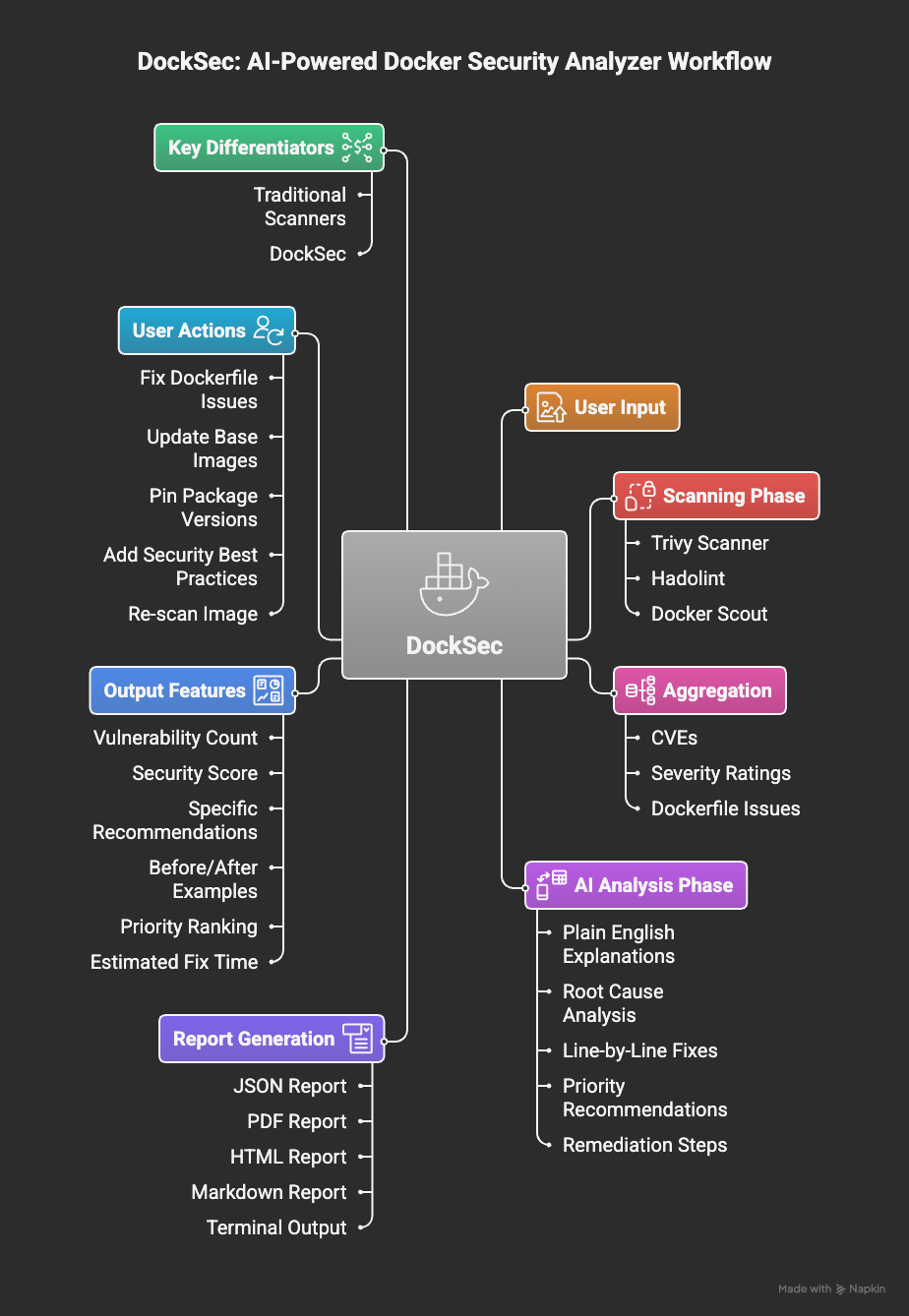
DockSec workflow: From scanning to actionable insights
DockSec follows a robust four-stage pipeline:
- Scan: Runs Trivy, Hadolint, and Docker Scout locally on your environment.
- Analyze: AI correlates findings across all scanners to remove noise and assess real-world impact.
- Recommend: Generates human-readable explanations and specific remediation steps.
- Report: Exports actionable results in JSON, PDF, HTML, or Markdown formats.
DockSec is led by a dedicated team committed to making container security accessible.
- Advait Patel - Project Lead
- Arkadii Yakovets - Project Co-lead
For questions or discussions, please join the #project-docksec channel on OWASP Slack.
Integrate DockSec into your GitHub Actions workflow:
- name: Run DockSec AI Scanner
  uses: OWASP/DockSec@main
  with:
    dockerfile: 'Dockerfile'
openai_api_key: ${{ secrets.OPENAI_API_KEY }}# Install DockSec
pip install docksec
# Scan a Dockerfile (AI-powered)
# Reports will be saved to ~/.docksec/results/
docksec Dockerfile
# Scan Dockerfile + Docker image
docksec Dockerfile -i myapp:latest
# Scan a Docker Compose file and all its services
docksec --compose docker-compose.yml
# Scan only a Docker image
docksec --image-only -i myapp:latest
# Fast scan only (no AI)
docksec Dockerfile --scan-only- Smart Analysis: AI explains what vulnerabilities mean for your specific setup.
- Multi-LLM Support: Use OpenAI, Anthropic Claude (4.x), Google Gemini (1.5+), or local models via Ollama.
- Docker Compose Scanning: Detect orchestration-level misconfigurations and scan all services in a compose file.
- Deep Integration: Combines Trivy (vulnerabilities), Hadolint (linting), and Docker Scout.
- Security Scoring: Get a 0-100 score to track your security posture over time.
- Centralized Reporting: All reports are neatly organized in
~/.docksec/results/by default. - Rich Formats: Professional exports in HTML (interactive), PDF, JSON, and CSV.
- CI/CD Ready: Designed for easy integration into GitHub Actions and build pipelines.
- GitHub Action: Available on the GitHub Marketplace for automated security scans.
Here is a comparison of how DockSec relates to other container security tools.
| Capability | DockSec | Trivy (standalone) | Snyk Container | Aikido |
|---|---|---|---|---|
| License and cost | Free, open source (MIT) | Free, open source (Apache 2.0) | Commercial (limited free tier) | Commercial (limited free tier) |
| Governance | OWASP Incubator Project, vendor neutral | Open source, maintained by Aqua | Single vendor | Single vendor |
| Detects CVEs and Dockerfile misconfigurations | Yes | Yes | Yes | Yes |
| Contextual, line level Dockerfile remediation | Yes (line specific rewrites with explanation) | No (detection only) | Yes (base image upgrade advice, fix PRs) | Yes (AI AutoFix PRs) |
| Runs fully offline / air gapped | Yes (local LLM via Ollama, scan only mode, no API key) | Yes for scanning (no remediation layer) | No (cloud platform) | No (hosted platform) |
| Your image data stays on your network | Yes | Yes | No | No |
| Bring your own LLM / model choice | Yes (OpenAI, Anthropic, Gemini, or local Ollama) | Not applicable | No (proprietary AI) | No (proprietary AI) |
| Self hostable, no platform deployment | Yes | Yes | No | No |
| Vendor lock in | None | None | Yes | Yes |
| Security score (0 to 100) and multi format reports (HTML, PDF, JSON, CSV, Markdown) | Yes | Partial (machine formats, no remediation report) | Partial (dashboard reports) | Partial (dashboard reports) |
DockSec is the only one of these that pairs contextual, line level Dockerfile remediation with a fully open source, OWASP governed, locally runnable design. Snyk and Aikido offer capable AI remediation, but only as commercial cloud platforms that send your data to their service. Trivy is open source and local but stops at detection and does not help you fix anything. DockSec fills the gap for developers and for regulated or air gapped teams who need both the fix guidance and full control of their data, at no cost.
DockSec thrives on community contributions. Whether you are a developer, designer, or security enthusiast, there are many ways to get involved:
- Code Contributions: Fix bugs or add new features.
- Documentation: Improve guides or create tutorials.
- Issue Reporting: Identify and report bugs.
- Feedback: Share your experience and suggestions.
To get started, check out our Contributing Guidelines, Code of Conduct, and Sponsorship Guide.
- OWASP Project Page: owasp.org/DockSec/
- OWASP Slack: #project-docksec
- PyPI: pypi.org/project/docksec/
- Issues: Report a bug
Built with ❤️ by Advait Patel and the OWASP community.