


Official React Native / Expo SDK for App Upgrade — a service to manage app version upgrades, force updates, and soft prompts across platforms.
For v1.x please refer to this README.
- 🚀 Force upgrade — show a non-dismissable dialog that directs users to the app store
- 💡 Soft upgrade — show a dismissable prompt with "Update Now" and "Later" options
- 📱 Cross-platform — supports iOS, Android, and Expo
- 🏪 Multi-store — Apple App Store, Google Play, Amazon Appstore, Huawei AppGallery, and custom URLs
- 🔒 TypeScript-first — written in TypeScript with full type definitions
| Apple App Store | Google Play Store | Amazon Appstore | Huawei AppGallery | Custom URL |
|---|---|---|---|---|
| ✅ | ✅ | ✅ | ✅ | ✅ |
npm install app-upgrade-react-native-sdk# or with yarn
yarn add app-upgrade-react-native-sdk# or with Expo
npx expo install app-upgrade-react-native-sdk| Dependency | Minimum Version |
|---|---|
react |
>= 18.0.0 |
react-native |
>= 0.72.0 |
Register on App Upgrade, create a project, and copy your x-api-key.
import { appUpgradeVersionCheck, AppUpgradeClient } from 'app-upgrade-react-native-sdk';
import type { AppInfo, AlertInfo } from 'app-upgrade-react-native-sdk';
import { Platform } from 'react-native';
import { useEffect, useMemo } from 'react';

const App = () => {
const client = useMemo(() => new AppUpgradeClient({
  apiKey: 'YOUR_API_KEY',
  debug: false, // Optional: enable console logs. Default: false
}), []);

  const appInfo: AppInfo = useMemo(() => ({
    appId: Platform.OS === 'ios' ? '1234567890' : 'com.example.myapp',
    // iOS: numeric App Store ID (not bundle ID)
    // Android: applicationId / package name
    appName: 'My App',
    appVersion: '1.0.0',
    platform: Platform.OS,            // 'android' | 'ios'
    environment: 'production',        // 'production' | 'development'
    appLanguage: 'en',                // Optional — for localized messages
  }), []);

  const alertConfig: AlertInfo = {    // Optional
    title: 'Update Available',
    updateButtonTitle: 'Update Now',
    laterButtonTitle: 'Later',
    onDismissCallback: () => console.log('Dismissed'),
    onLaterCallback: () => console.log('Later'),
    onUpdateCallback: () => console.log('Updating'),
  };

  useEffect(() => {
    appUpgradeVersionCheck(client, appInfo, alertConfig);
  }, [client, appInfo]);

  return (
    // your app JSX
  );
};
Tip: Call the version check from
useEffect(or when the app becomes active) so it runs once per session instead of every render.
Initialize the client with your credentials before calling version check.
const client = new AppUpgradeClient({
  apiKey: string;      // Your App Upgrade project key
  baseURL?: string;    // Override default API URL
  debug?: boolean;     // Enable SDK debug logs (default: false)
});Checks the app version with App Upgrade and shows an upgrade dialog when needed.
| Parameter | Type | Required | Description |
|---|---|---|---|
client |
AppUpgradeClient |
✅ | The initialized API client |
appInfo |
AppInfo |
✅ | App metadata for the version check |
alertConfig |
AlertInfo |
— | Customize the alert dialog |
interface AppInfo {
  appId: string;                                    // Store ID or package name
  appName: string;                                  // Display name
  appVersion: string;                               // Current version (e.g. "1.0.0")
  platform: string;                                 // "android" | "ios"
  environment: string;                              // "production" | "development"
  appLanguage?: string;                             // Locale code (e.g. "en", "es")
  preferredAndroidMarket?: PreferredAndroidMarket;  // Default: Google Play
  otherAndroidMarketUrl?: string;                   // Required when market is OTHER
  customAttributes?: Record<string, string>;        // Custom key-value pairs
}interface AlertInfo {
title?: string; // Dialog title (default: "Please update")
updateButtonTitle?: string; // Update button text (default: "Update Now")
laterButtonTitle?: string; // Later button text (default: "Later")
onDismissCallback?: () => void; // Non-force only
onLaterCallback?: () => void; // Non-force only
onUpdateCallback?: () => void; // Force + non-force
}enum PreferredAndroidMarket {
GOOGLE = 'Google', // Google Play Store (default)
HUAWEI = 'Huawei', // Huawei AppGallery
AMAZON = 'Amazon', // Amazon Appstore
OTHER = 'Other', // Custom URL (requires otherAndroidMarketUrl)
}import { appUpgradeVersionCheck, PreferredAndroidMarket, AppUpgradeClient } from 'app-upgrade-react-native-sdk';
import type { AppInfo } from 'app-upgrade-react-native-sdk';
const client = new AppUpgradeClient({ apiKey: 'YOUR_API_KEY' });
const appInfo: AppInfo = {
appId: 'com.example.myapp',
appName: 'My App',
appVersion: '1.0.0',
platform: 'android',
environment: 'production',
preferredAndroidMarket: PreferredAndroidMarket.AMAZON,
};
appUpgradeVersionCheck(client, appInfo);const appInfo: AppInfo = {
appId: 'com.example.myapp',
appName: 'My App',
appVersion: '1.0.0',
platform: 'android',
environment: 'production',
preferredAndroidMarket: PreferredAndroidMarket.OTHER,
otherAndroidMarketUrl: 'https://my-custom-store.com/app/myapp',
};If the preferred marketplace fails to open, the SDK automatically falls back to the Google Play Store.
platformandappIdshould match the current device platform. The SDK usesplatformto talk to App Upgrade andPlatform.OSto open the store.- The iOS
appIdmust be the numeric App Store ID. The AndroidappIdmust be the package name. appUpgradeVersionCheckis fire-and-forget. It triggers UI alerts and store redirects without returning a result to your app.- For force upgrades, the SDK re-checks on app resume and will show the dialog again if the upgrade is still required.
| Callback | Trigger | Use Case |
|---|---|---|
onDismissCallback |
User taps outside the dialog (non-force only) | Analytics, custom logging |
onLaterCallback |
User taps "Later" (non-force only) | Schedule a reminder |
onUpdateCallback |
User taps "Update Now" | Analytics, cleanup tasks |
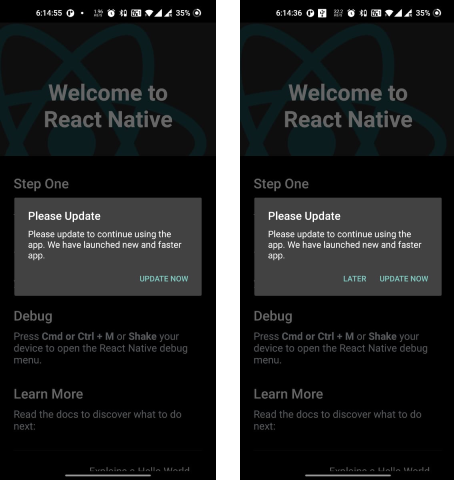
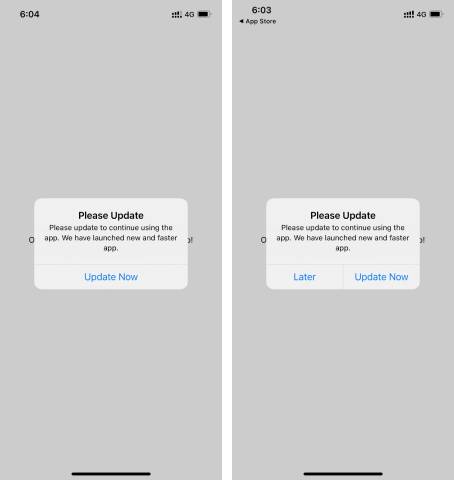
Force upgrade — only the Update button is shown; the user cannot skip. Recommended upgrade — both Update and Later buttons are shown.
- The app must be published in the store for the redirect to work.
- Store redirects may not work in simulators — test on a physical device.
- Find a sample app here: app-upgrade-react-native-demo-app
- Read the integration guide: How to force upgrade a React Native app
- 📖 Documentation
- ❓ FAQ
- 📝 Changelog
- 📧 Support: support@appupgrade.dev
Please see CONTRIBUTING and CODE OF CONDUCT for details.