Golang SDK for authorizer.dev server. This SDK will be handy to add API middleware where you can authorize your users. It will also empower you to perform various auth operations on authorizer server.
For detailed explanation of each functions check official docs
Pre-requisite: You will need an authorizer instance up and running. Checkout how you can host your instance in the docs
Follow the steps here to install authorizer-go in your golang project and use the methods of SDK to protect/authorize your APIs
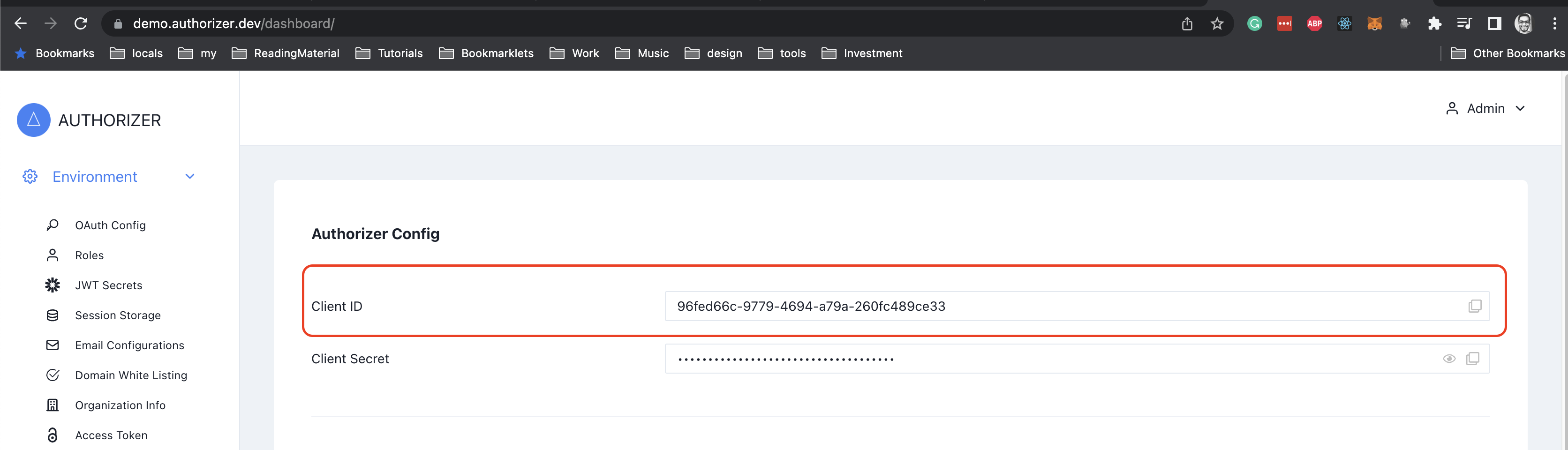
Once you have deployed authorizer instance. Get Client ID from your authorizer instance dashboard
Run the following command to download authorizer-go SDK
go get github.com/authorizerdev/authorizer-goParameters
| Key | Type | Required | Description |
|---|---|---|---|
clientID |
string |
true |
Your unique client identifier obtained from authorizer dashboard |
authorizerURL |
string |
true |
Authorizer server URL |
redirectURL |
string |
false |
Default URL to which you would like to redirect the user in case of successful signup / login / forgot password |
extraHeaders |
map[string]string |
false |
set of headers that you would like to pass with each request |
Example
defaultHeaders := map[string]string{}

authorizerClient, err := authorizer.NewAuthorizerClient("YOUR_CLIENT_ID", "YOUR_AUHTORIZER_URL", "OPTIONAL_REDIRECT_URL", defaultHeaders)
if err != nil {
    panic(err)
}Example
response, err := authorizerClient.Login(&authorizer.LoginInput{
    Email:    "test@yopmail.com",
    Password: "Abc@123",
})
if err != nil {
    panic(err)
}Authorizer ships an embedded OpenFGA engine for relationship-based
access control (ReBAC). You model your domain as object types with relations
(viewer, editor, owner…), grant access by writing relationship tuples
(user:alice is viewer of document:1), and ask the engine whether access is allowed.
Authoring the model and tuples is an admin task — do it once in the dashboard under
Authorization, or via the _fga_* admin GraphQL API. The SDK exposes only the
read-side checks an application needs at request time. For every call the subject
defaults to the authenticated caller and is pinned server-side from the request
headers (bearer token / session cookie), so pass them. The optional User field
("type:id", or a bare id treated as "user:<id>") overrides the subject, but is
honored only when the caller is a super-admin or it equals the caller's own token
subject — anything else is rejected by the server.
1. Check permissions — CheckPermissions evaluates one or more
"does the caller have relation on object?" checks in a single round trip.
Each result echoes its relation/object pair and comes back in the same order as
the supplied checks.
res, err := authorizerClient.CheckPermissions(&authorizer.CheckPermissionsRequest{
    Checks: []*authorizer.PermissionCheckInput{
        {Relation: "can_view", Object: "document:1"},
        {Relation: "can_edit", Object: "document:1"},
    },
}, map[string]string{
    "Authorization": "Bearer " + token,
})
if err != nil {
    panic(err)
}
for _, r := range res.Results {
    fmt.Println(r.Relation, r.Object, r.Allowed)
}
2. List accessible objects — ListPermissions returns the ids of every object of a
type the caller holds a relation on (handy for filtering a list to what the user can see).
res, err := authorizerClient.ListPermissions(&authorizer.ListPermissionsRequest{
    Relation:   "can_view",
    ObjectType: "document",
}, map[string]string{"Authorization": "Bearer " + token})
if err != nil {
    panic(err)
}
fmt.Println(res.Objects) // ["document:1", "document:7", ...]Note: This example demonstrates how to use authorizer in middleware for a go-gin server. But logic remains the same under the hood, where you can get auth token from
headerand validate it via authorizer SDK
package main

import (
	"net/http"
	"strings"

	"github.com/authorizerdev/authorizer-go"
	"github.com/gin-gonic/gin"
)

func AuthorizeMiddleware() gin.HandlerFunc {
	return func(c *gin.Context) {
		/**
		  for open routes you can add condition here and just return with c.Next()
		  so that it does not validate token for those routes
		*/

		authHeader := c.Request.Header.Get("Authorization")
		tokenSplit := strings.Split(authHeader, " ")

		defaultHeaders := map[string]string{}
		authorizerClient, err := authorizer.NewAuthorizerClient("YOUR_CLIENT_ID", "YOUR_AUHTORIZER_URL", "OPTIONAL_REDIRECT_URL", defaultHeaders)
		if err != nil {
			// unauthorized
			c.AbortWithStatusJSON(401, "unauthorized")
			return
		}

		if len(tokenSplit) < 2 || tokenSplit[1] == "" {
			// unauthorized
			c.AbortWithStatusJSON(401, "unauthorized")
			return
		}

		res, err := authorizerClient.ValidateJWTToken(&authorizer.ValidateJWTTokenInput{
			TokenType: authorizer.TokenTypeIDToken,
			Token:     tokenSplit[1],
		})
		if err != nil {
			// unauthorized
			c.AbortWithStatusJSON(401, "unauthorized")
			return
		}

		if !res.IsValid {
			// unauthorized
			c.AbortWithStatusJSON(401, "unauthorized")
			return
		}

		c.Next()
	}
}

func main() {
	router := gin.New()
	router.Use(AuthorizeMiddleware())

	router.GET("/ping", func(c *gin.Context) {
		c.JSON(http.StatusOK, gin.H{
			"message": "pong",
		})
	})

	router.Run(":8090")
}
CURL command to test go-gin server created in example
Copy JWT ID token from login response of authorizer login mutation / social media login and replace JWT_TOKEN below
curl --location --request GET 'http://localhost:8090/ping' \
--header 'Authorization: Bearer JWT_TOKEN'