


Bard is a text-to-speech client that integrates on the desktop.
- Multiple input sources. Feed bard plain text, the clipboard, a URL, an HTML file, or a PDF — it extracts the readable content (with readability) and speaks it. Useful for reading paywalled articles via "View Page Source".
- Four TTS backends. OpenAI and ElevenLabs (remote, API key) plus Kokoro and Piper (local, free, offline, multilingual). Switch backend, model, and voice at runtime from the tray menu without restarting.
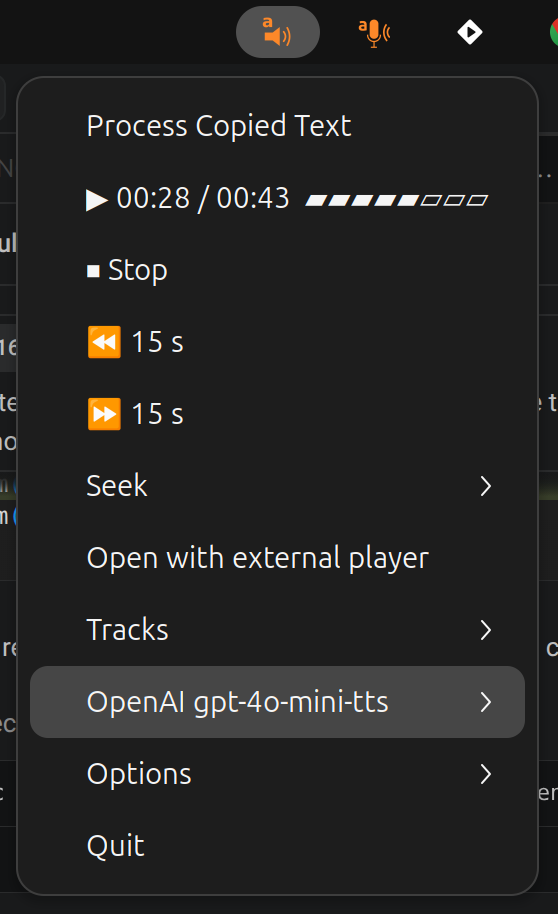
- Desktop player. A system-tray icon with playback controls, or a
keyboard-driven terminal dashboard with
--no-tray. A global shortcut can read the clipboard from anywhere (works on Wayland too). - Batch or interactive. Pass
-o file.mp3to synthesise straight to an audio file and exit, or run interactively and drive playback from the tray.
Full documentation lives at https://perrette.github.io/bard/:
- Installation (incl. system dependencies)
- Quickstart
- Backends & voices
- Tray menu
- Guides: input sources, batch render, global keyboard shortcut, fine-tuning, player, Android
Install the system dependencies, then the app with all optional backends:
sudo apt-get install portaudio19-dev xclip #  portaudio19-dev becomes portaudio with Homebrew
sudo apt install libcairo-dev libgirepository1.0-dev gir1.2-appindicator3-0.1  # Ubuntu ONLY (not needed on MacOS)
pip install PyGObject # Ubuntu ONLY (not needed on MacOS)

pip install bard-cli[all]          # OpenAI, ElevenLabs, Kokoro (no Piper)
pip install bard-cli[all-local]    # all of the above + Piper
See the installation page for individual backend extras and the GNOME launcher.
barddefaults to bard --backend openai --voice alloy --model gpt-4o-mini-tts
(assuming OPENAI_API_KEY is set). An icon shows up in the system tray with an
option to read the clipboard aloud.
You can also do a one-off reading:
bard --text "Hello world, how are you today"
bard --clipboard
bard --url "example.com"
bard --pdf-file /path/to/document.pdf
See the quickstart and input sources pages for more.
A few other open-source tools I maintain.
Scientific writing & data
- texmark — write scientific articles in Markdown and convert them to journal-ready LaTeX/PDF.
- papers — command-line BibTeX bibliography and PDF library manager.
- datamanifest — declarative, reproducible dataset management. (See also the datamanifest.toml format spec and the DataManifest.jl Julia port.)
Speech to Text (dictate) and Text to Speech (read-aloud) tools
- scribe — speech-to-text dictation.
The player was devised in conversation with Mistral's Le Chat and OpenAI's
ChatGPT, and my own experience with pystray on
scribe.